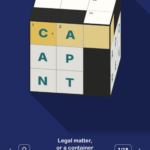
Balancing a hectic schedule means my gaming time usually happens in snatched five-minute pockets rather than sprawling, multi-hour sessions.
When I finally get a quiet moment to unwind, I love a puzzle that wakes up my brain without demanding a massive time commitment.
Developed and published by Space Inch, LLC, Cubewords: Cube Crossword is a 3D word puzzle game on iOS, Android, and web browsers that takes the classic newspaper crossword and wraps it onto all six faces of a rotatable digital block.
Instead of staring at a static grid, you spin a virtual cube where clues bend right around corners and edges.
It promises a brisk, tactile mental workout for word fans who appreciate spatial reasoning alongside vocabulary tests.
However, once the novelty of spinning the cube wears off, does the game hold up, or does its subscription paywall cut the fun too short?
Gameplay
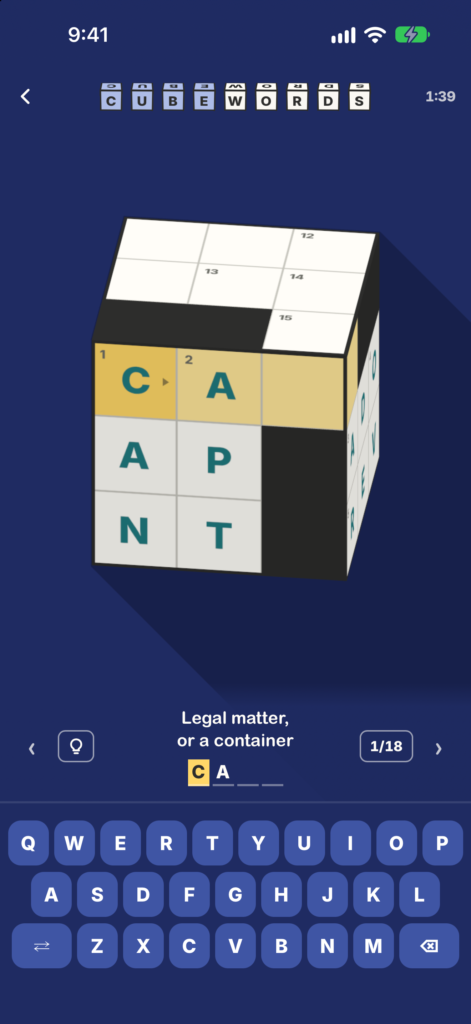
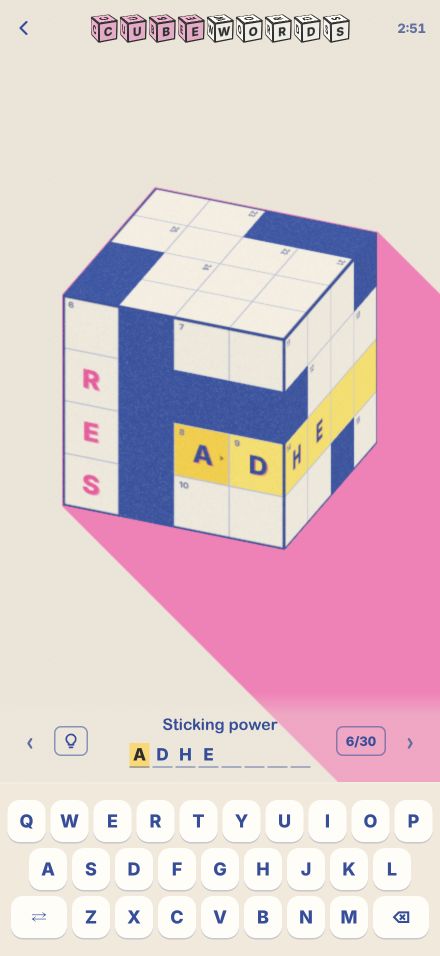
Cubewords translates familiar crossword rules into an intuitive, touch-friendly 3D space. You drag a finger across the screen to spin the cube in any direction, tap a square to highlight your active clue, and punch letters into a clean on-screen keyboard.
Because words frequently wrap across ninety-degree edges onto neighbouring faces, solving a clue requires genuine mental gymnastics.
During my first few sessions, I found myself constantly rotating the block to see how a down-word on the top face collided with an across-word wrapping onto the side.
Once your brain adjusts to tracking letters around corners, that extra layer of spatial strategy makes flat paper crosswords feel almost tame by comparison.
The daily structure fits effortlessly into a busy routine, offering a few distinct modes to keep things fresh.
Every player gets a free 2×2 “Cubewords Mini” as a warm-up, followed by a free, easy 3×3 cube each day.
There is also a daily “Wordwind” mode, which shifts gears from clue-solving to a Boggle-style scramble where you trace chains of adjacent letters across the cube’s faces to uncover as many words as possible.
One of my favourite touches is the “Make a Cube” feature. It is completely free to use and lets you build custom puzzles with personalised themes to send wrapped to family or friends, complete with notifications when they crack your clues.
Where the experience hits a snag is its monetisation model. While the daily Mini, Easy 3×3, and Wordwind modes are free for everyone, the deeper content sits behind a paid subscription called Cubewords Plus.
Paying for the subscription unlocks medium and hard 4×4 cubes, massive monthly mega cubes, streak-repair tools, and the entire archive of past puzzles.
Whenever I had a rare twenty-minute break and wanted to binge a few tougher grids back-to-back, running into that subscription wall right after finishing the breezy free boards felt genuinely disappointing.
Even with a seven-day free trial on offer, players who prefer owning their games outright rather than paying recurring annual fees may find their daily playtime cut frustratingly short.
On the technical side, touch controls are snappy and accurate, with smooth performance during rapid spins.
Visuals
Visually, Space Inch has embraced a clean, minimalist look that puts readability first without feeling sterile.
Because you are constantly spinning a three-dimensional block covered in text, visual clutter would have made the game unplayable, so the crisp typography and sharp grid lines are a massive relief.
Tapping a clue illuminates the entire word path cleanly across edges, making it effortless to see where an answer starts, bends, and finishes, even from an awkward angle.
What gives the visuals real personality is the tactile polish baked into the animations. Spinning the cube carries a satisfying sense of physical weight and momentum.
The developers leaned so heavily into this toy-like feel that they included ten dedicated “fidget spinner” cube variations just for the joy of flicking them around on your screen.
Unlockable visual themes, ranging from warm wood tones to sleek dark modes, and bespoke wrapping paper animations for custom friend-made puzzles add welcome bursts of colour.
On both phone screens and larger tablets, the interface scales gracefully with plenty of breathing room.
sounds
Audio in mobile word games is often forgettable, usually muted in favour of background noise or music, yet Cubewords makes its soundscape surprisingly soothing.
Instead of a repetitive, looping soundtrack, the game relies on understated, tactile sound effects that sell the illusion of handling a real mechanical puzzle box.
Every tap on a tile, click of the keyboard, and flick of the cube produces crisp, subtle audio feedback that makes typing feel remarkably responsive.
Completing a word or clearing an entire face triggers a soft, pleasant chime that rewards your progress without ever feeling loud or jarring.
There is no voice acting or dramatic score here, and that restraint suits the calm, focused nature of puzzle-solving brilliantly.
With zero audio glitches or sudden volume spikes, the sound design creates a relaxing acoustic backdrop for a quiet morning break.
final thoughts
Cubewords: Cube Crossword is a clever, impeccably polished twist on a timeless pastime.
By wrapping crosswords around a six-sided cube, Space Inch has built a puzzle game that challenges your vocabulary and spatial awareness in equal measure.
The tactile satisfaction of spinning the block, paired with crisp visuals, a thoughtful free custom puzzle creator, and bite-sized daily modes, makes it an easy habit to weave into a packed day.
Still, locking tougher difficulty tiers and the puzzle archive behind the Cubewords Plus subscription holds it back from being a complete triumph for free players.
If you only want a brisk, breezy ten-minute brain teaser each morning, the free tier delivers plenty of charm without annoying banner ads.
However, dedicated crossword fans craving harder 4×4 grids and unlimited archive access will have to weigh whether the subscription cost justifies the daily mental workout.
If you love word games and appreciate smart, tactile mobile design, it is well worth downloading and giving the free daily cubes a spin.
Cubewords: Cube Crossword brings a refreshing, tactile third dimension to classic word puzzles with slick visuals and responsive controls, though locking tougher difficulties and the puzzle archive behind a paid subscription limits its appeal for free players.
I’d like to extend a huge thank you to the developers and publishers for giving me the opportunity to experience and review Cubewords: Cube Crossword.
It’s been an absolute pleasure getting stuck into another great game!
A massive thank you to all of you for taking the time to read my review. Your continued support means a great deal to me and everyone here at IndieCritical. We hope to see you again for the next one!
A code for Cubewords: Cube Crossword was provided for review purposes.
Positives
✅ Clever 3D Mechanics: Wrapping clues around cube corners adds a rewarding layer of spatial reasoning to traditional crosswords.
✅ Tactile Presentation: Smooth rotation physics, clean typography, and fun fidget-spinner cube toys make interacting with the game a joy.
✅ Free Custom Puzzle Maker: Creating and sending wrapped custom cubes to friends and family is completely free and thoughtfully executed.
✅ Bite-Sized Daily Modes: Offers a great mix of quick 2×2 Mini grids, 3×3 Easy puzzles, and Boggle-style Wordwind challenges that fit easily into a busy schedule.
Negatives
❌ Subscription Paywall: Medium and hard 4×4 cubes, monthly mega cubes, streak repairs, and past puzzle archives require a paid Cubewords Plus subscription.
❌ Short Free Sessions: Once you finish the daily free puzzles, there is nothing left to solve unless you subscribe or build your own cubes.
❌ English-Only Clues: Although the interface supports 30 languages, all crossword clues remain strictly in English.

I am a New Jersey-based game reviewer, future behavioral therapist, and lifelong gamer with a deep appreciation for the human stories behind interactive worlds. With a professional background rooted in youth advocacy and mental health studies, I bring an empathetic, people-first lens to game criticism, exploring how mechanics, atmosphere, and narrative resonate with players. Whether diving into retro-inspired RPGs or hidden indie gems, I love sharing honest critiques and fostering positive spaces for everyone.
Written by

Kitty
@IndieKitty